
Know what's left before your customer does
The worst message you can send a customer is that the thing they ordered isn't there. Stock here is attached to the product itself: it drops when an order is placed, comes back when an order is cancelled, and the store stops selling the item when it hits zero. And before you get to zero, an alert reaches you.
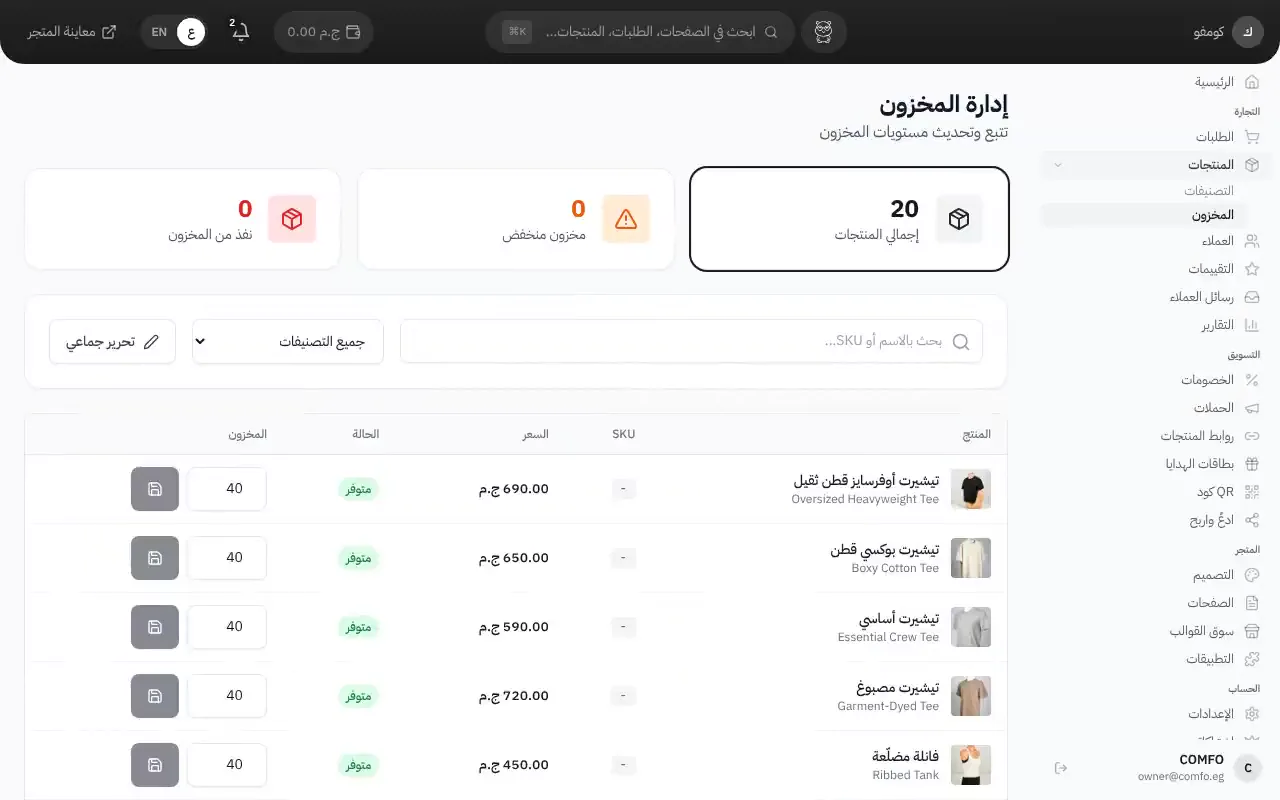
What it actually does
One screen for stock
A table of every product and its quantity. Edit a single number, or update a group of products in one go instead of opening each product separately — that's the difference between a stock update taking a minute and taking an hour.
Counters at a glance
How many products are running low and how many have run out, on the screen itself, with nothing to search for.
A daily alert
Each morning you get an alert listing the products that have fallen below the threshold — on WhatsApp if your number is connected, by email, and in the notification bell inside the dashboard.
Per-variant stock
Quantity is counted per variant, so the size that has sold out stops selling without taking the other sizes down with it.
How it works
Enter the quantities
From Dashboard → Inventory, or when you add the product.
Sell
Stock drops with every order on its own. There's no extra step.
Get the alert
The daily alert tells you which products need restocking.
Restock
Update the quantity from the same screen, one item or many.
Who this is for
- Stores with a large catalogue, where tracking stock by hand isn't practical.
- Stores selling online and offline at once that need one number they can trust.
- Any merchant whose supplier has a lead time, so they need warning before running out, not after.
- Stores selling products in sizes or colours.
Common questions
Does it support more than one warehouse?
No. Today it tracks one quantity per product for the whole store, not a quantity per branch or warehouse.
If an order is cancelled, does the stock come back?
Yes, automatically.
How does the alert reach WhatsApp?
Your WhatsApp number has to be connected to the store. If it isn't, the alert still arrives by email and in the notification bell.
Does the store stop selling when stock runs out?
Yes — a product is closed to purchase once its quantity reaches zero.
More features
Ready to start your store?
Start your store now — free, no credit card
- No credit card
- Set up in minutes
- Arabic support team