
A store that looks like yours, without opening a code editor
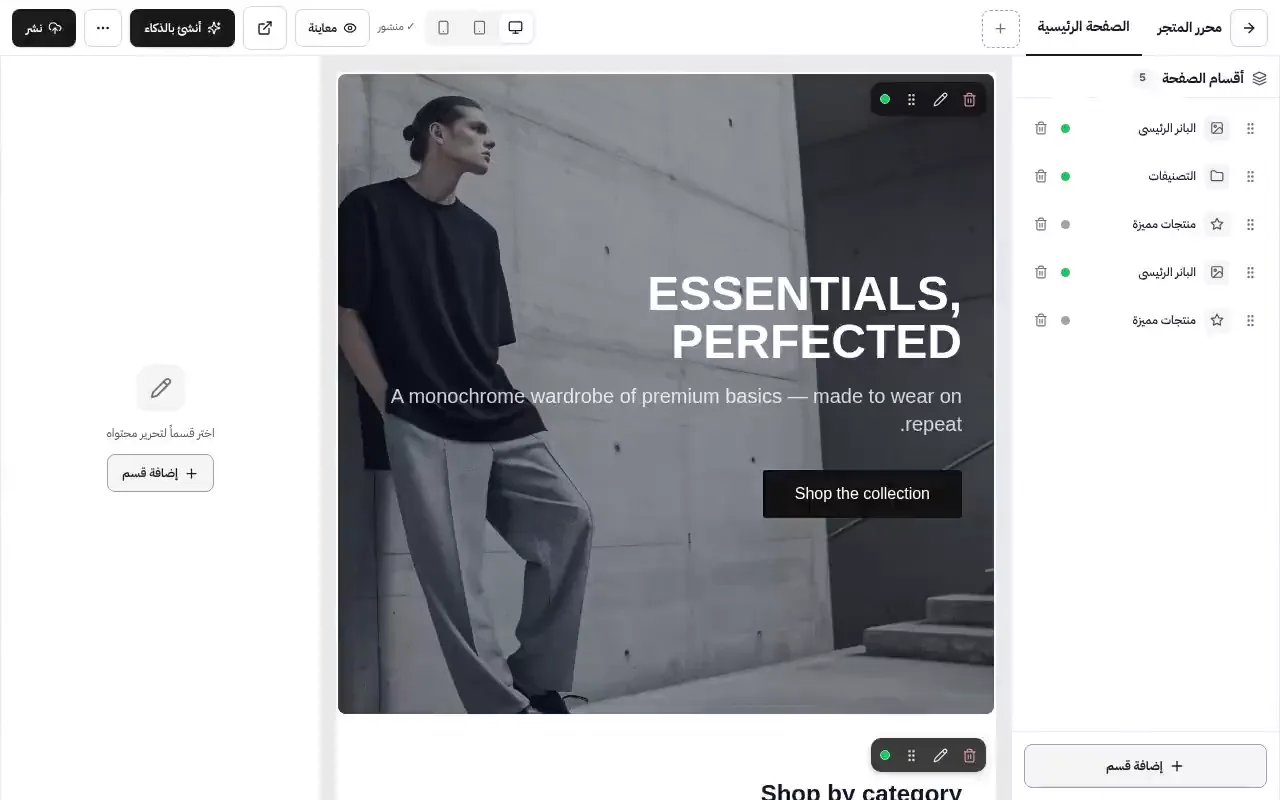
How a store looks isn't a detail — it's the first impression, and it's the difference between a store that reads as trustworthy and one that reads as temporary. The idea here is that you start from a template close to your line of work, adjust it by dragging things around, and everything you do sits in a draft until you say publish. And if an edit turns out wrong, there's a version history to go back to.
What it actually does
Ready templates
Nineteen templates across different lines of work — clothing, cafés and restaurants, electronics, beauty, kids' products and more. You preview a template before installing it, and installing one saves a copy of your existing design first.
Sections you drag into place
Hero banner, featured products, categories, gallery, testimonials, FAQ, countdown timer, trust badges, newsletter signup, map, size guide and more — thirty types. Reorder them by dragging, and switch any section off or show it on mobile only.
Colours and Arabic typefaces
Pick your store's colours, and pick the typeface from a list of real Arabic fonts — Cairo, Tajawal, IBM Plex Sans Arabic, Noto, Almarai, Changa, El Messiri. Preview the result at desktop, tablet and phone widths before publishing.
Draft, publish, roll back
Every edit goes to a draft, and the live store is untouched until you press publish. Each publish is kept in the version history, so if you publish something that turns out wrong you go back to the previous version in one click.
How it works
Pick a template
Preview the templates and take the one closest to your line of work.
Build the page
Add the sections you need and drag them into order.
Set the look
Colours and fonts, previewed on a phone before anything else.
Publish
When you're ready, press publish — the old version stays saved.
Who this is for
- Anyone starting a store who doesn't want to wait on a designer.
- Stores that change their look every season or with every campaign.
- Anyone who wants to try a new design without risking the live store.
- Stores where most visitors are on a phone and the phone view has to be right.
Common questions
If I install a new template, do I lose my current design?
No. Before a template is installed, your current design is saved as a version you can restore from the history.
Can I add pages beyond the homepage?
Yes — you can create extra pages such as About or a returns policy and build them from the same sections.
Can I add my own CSS?
Yes, there's a place for custom CSS. It is filtered before publishing for security reasons.
Do edits show to customers straight away?
Not until you press publish. Until then everything is in the draft.
Ready to start your store?
Start your store now — free, no credit card
- No credit card
- Set up in minutes
- Arabic support team